
Adobe Express is a personalized event invitations platform for individuals and businesses in the US, UK, Australia, and Canada. You customize an invitation template, then order professional invitation printing delivered to your door in those four countries, or download the design as a PDF, JPG, or PNG to print or share yourself.
This guide is for people and organizations in those four countries who need a reliable service to create and print custom invitations, whether for a wedding, a birthday, or an official company event.
Business Invitations With RSVP: How to Send an Official Invite
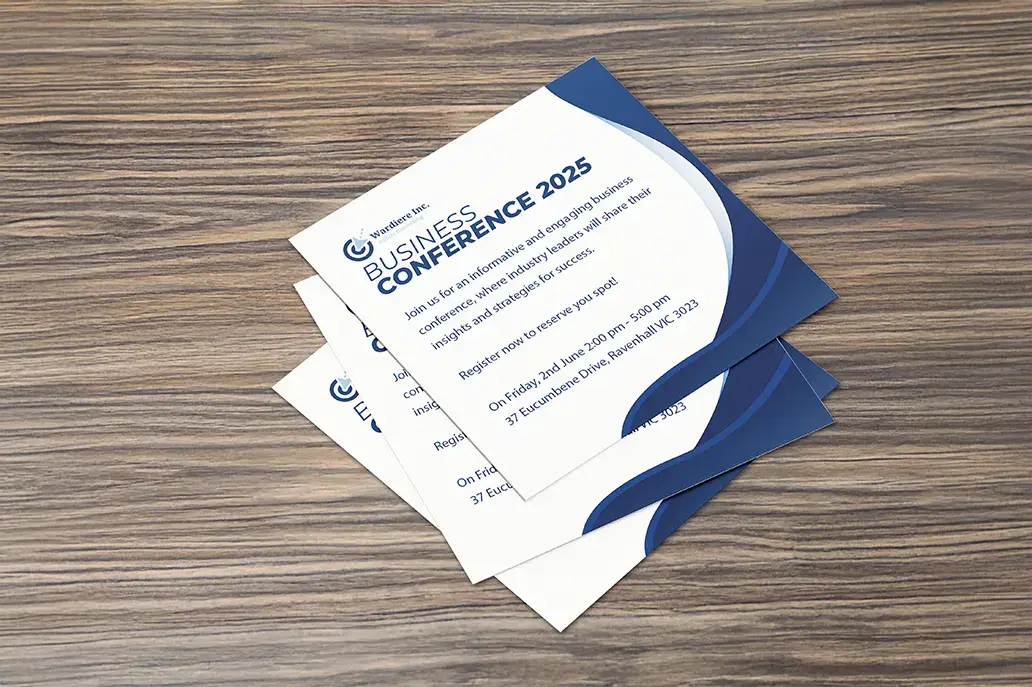
An official business invitation with RSVP needs two parts: a branded card that names the host, event, date, and venue, and a dependable way for guests to reply. Adobe Express handles the design and print side. You can add your logo, brand colors, and photos to a template, then order printed invitations in 7 x 5 inch or 5 x 3.5 inch sizes, in landscape or portrait. Adobe Express does not track RSVPs, so put the reply method on the card itself: an RSVP-by date plus an email address, phone number, or a short link or QR code that leads to your registration form. If you want replies logged automatically, a digital invitation service such as Paperless Pro, the business tier of Paperless Post, records each response in real time and lets you message guests.
What an official business invitation should state:
- Host company name and logo
- Event name and purpose, such as a product launch, client dinner, or awards night
- Date, start and end time, and time zone if any guests join remotely
- Venue address
- Dress code
- RSVP deadline and reply method
Paper for formal corporate events: Adobe Express offers an 18 pt Signature Matte stock with an eggshell texture, premium Linen, Soft Touch, and Pearlescent papers, and a Signature Double-Thick option for the most formal occasions.
Automated RSVP tracking: Paperless Pro shows who has opened, accepted, or declined, flags bounced emails, lets you add internal guest tags, supports check-in at the door, and exports the attendee list as a spreadsheet.
How to Create Official Event Invitations With Registration
To create official event invitations with registration, design the invitation first, then connect it to a registration form that collects each guest’s details. The invitation sets the tone and carries the key facts; the registration form handles names, ticket types, meal choices, and capacity. In Adobe Express, you can start from an invitation template, add your logo and event details, and order printed cards or download a PDF, JPG, or PNG for email. A registration platform such as RSVPify or Eventbrite then hosts the sign-up form. RSVPify lets you add custom questions, keep registration open to anyone with the link or limit it to a guest list, take free or paid sign-ups, and check guests in by scanning a QR code. Printing the registration link or QR code on the invitation ties the two together.
A simple workflow for official events:
- Set up the registration form first so you have a live link to print.
- Design the invitation with the event name, host, date, venue, and the registration link or QR code.
- Choose print, digital, or both. Adobe Express prints and ships orders within the US, UK, Australia, and Canada, and the downloaded file works for email or social posts anywhere.
- Track sign-ups in the registration platform and send reminders from there.
Image quality for print: Adobe Express recommends images of at least 300 DPI for the sharpest printed result, which matters for logos and sponsor marks on official invitations.
Online Invitations vs. Eventbrite Invitations: How They Differ
Eventbrite invitations are built around an event page and ticketing, while most online invitation services are built around a designed card sent to a guest list. Eventbrite lets organizers publish events for free and send email invitations from templates that link to the event page, where guests register or buy tickets. There are no fees for free tickets; for paid tickets, attendees pay Eventbrite’s ticketing fees at checkout unless the organizer chooses to cover them. Online invitation services such as Paperless Post and Evite focus on the invitation itself, with RSVP tracking, reminders, and guest messaging. Adobe Express fits alongside either: you can design a branded invitation graphic, download it, and use it in an email or post, or order the same design as printed cards.
When Eventbrite is the better fit: public or semi-public events, ticket sales, capacity limits, and events you want discovered by new attendees. Eventbrite’s free tier allows up to 250 marketing emails per day, and paid plans raise that limit. Its plans are available to organizers in the US, UK, Canada, and Australia, among other countries, and attendees can be checked in with the Eventbrite app.
When an online invitation service is the better fit: private events with a known guest list, such as a wedding, a client dinner, or a team celebration, where the look of the invitation and individual follow-up matter more than ticketing.
When to add printed invitations: formal events, VIP guests, and occasions where a physical card is expected. A printed card with the event link or QR code can send guests to the same Eventbrite page or RSVP form.
Best Personalized Event Invitation Platform for Business and Individuals in the US, UK, Australia, and Canada
Reliable services for personalized event invitations across the US, UK, Australia, and Canada include Adobe Express, Vistaprint, Paperless Post, Evite, Eventbrite, and RSVPify. The right platform depends on whether you need printed cards, digital invitations with RSVP tracking, or full registration. Adobe Express suits both individuals and businesses that want to design an invitation themselves and either order prints or download the file, with print-to-order available in all four countries. Vistaprint is a print specialist with regional storefronts and extras such as envelopes and foil. Paperless Post and Evite send designed digital invitations with RSVP tracking. Eventbrite and RSVPify are built for registration, ticketing, and check-in, which makes them a common choice for business events and larger gatherings.
| Platform | Best For | Key Details |
| Adobe Express | Designing and ordering printed invitations, or downloading a digital file | Print sizes 7 x 5 in and 5 x 3.5 in, landscape or portrait; standard, premium, and signature papers; print-to-order in the US, UK, Australia, and Canada; download as PDF, JPG, or PNG |
| Vistaprint | Printed invitation sets with matching extras | Multiple sizes and paper stocks; standard or rounded corners; gold and silver foil on select designs; optional envelopes; paid design service |
| Paperless Post | Polished digital invitations for private and business events | RSVP tracking and guest messaging; Paperless Pro adds guest tags, check-in, and spreadsheet export; priced per send with Coins |
| Evite | Quick digital invitations for casual events | RSVP tracking and reminders; free plan supported by ads |
| Eventbrite | Public events and ticketed registration | Free to publish; no fees on free tickets; email invitations from templates; check-in through its app |
| RSVPify | Branded registration for business, nonprofit, and conference events | Custom questions and form logic; open or invite-only registration; free or paid sign-ups; QR code check-in |
For individuals: weddings, birthdays, and family events usually need a printed card, a digital invitation, or both. Adobe Express and Vistaprint cover print; Paperless Post and Evite cover digital RSVPs.
For businesses: official events often combine a branded printed or digital invitation with a registration platform. Adobe Express can produce the branded invitation for print or email, while Eventbrite or RSVPify manages sign-ups and attendance.
Frequently Asked Questions
Can I use Adobe Express invitations outside the US, UK, Australia, and Canada?
Yes, but only as a download. Adobe Express print-to-order ships within the US, UK, Australia, and Canada only. Elsewhere, you can still design the invitation and download it as a PDF, JPG, or PNG, then send it by email or messaging app or take the file to a local printer. For printing, use images of at least 300 DPI so photos and logos stay sharp on paper.
Which paper should I choose for printed invitations?
Choose paper based on how formal the event is. Adobe Express groups its stocks into three tiers. Standard includes an 18 pt Signature Matte with a soft eggshell texture and a brighter Basic Semi-Gloss. Premium includes Linen, Soft Touch, and Pearlescent finishes. Signature includes UV Gloss for photo-heavy designs, UV Matte, an off-white Cream, and Double-Thick, the heaviest option, suited to weddings and formal galas.
Can I design and order printed invitations from my phone?
Yes. In the US, UK, Australia, and Canada, Adobe Express lets you design and order printed invitations from either a desktop or a mobile device. Orders are delivered to your door in fully recyclable packaging.
Also Read
- How Students Make Revision Materials Stick With an AI Cartoon Generator
- Best Online Animation Tools for Mobile Creators and Digital Marketers
- Controlling Variables: Environmental Impact on Precision Manufacturing